This tutorial details of how to write a new Scala Improvement Proposal (SIP) and how to submit it.
Why write a SIP?
SIPs are key to making Scala better for the good of everyone. If you decide to invest the time and effort of putting a SIP forward and seeing it through, your efforts and time will shape and improve the language, which means that your proposal may impact the life of a myriad of developers all over the world, including those on your own team. For many, this aspect alone can be quite worthwhile.
However, it’s important to note that seeing a SIP through to its conclusion is an involved task. On the one hand, it takes time to convince people that your suggestions are a worthwhile change for hundreds of thousands of developers to accept. Particularly given the sheer volume of developers that could be affected by your SIP, SIP acceptance is conservative and carefully thought through.
It is important to note that seeing a SIP through to its conclusion can be time-consuming and not all SIPs may end up in the Scala compiler, although they may teach us all something!
Last, but not least, delivering a basic implementation can speed up the process dramatically. Even compiler hackers find very difficult to predict the interaction between the design and the implementation, so the sooner we have an evidence of a working prototype that interacts with all the features in Scala, the better.
If you’re motivated enough to go through this involved but rewarding process, go on with writing and keep on reading.
The following sections provide an overview of the process, and guidelines on how to submit a proposal. The detailed process specification is available here.
Overview of the process
From being an idea to being part of the language, a SIP goes through several stages that indicate the “maturity” level of the SIP. The following diagram summarizes the purpose of each stage:
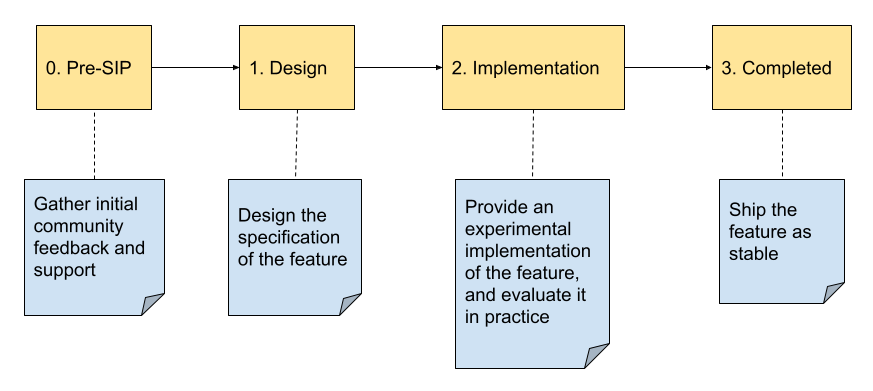
- Pre-SIP You should start by creating a discussion thread in the Scala Improvement Process category of the Scala Contributors forum to gather initial community feedback and support. The title of your discussion should start with “Pre-SIP”. In this discussion, the community might bring you alternative solutions to the problem you want to solve, or possible bad interactions with other features of the language. Eventually, these discussions may help you polish your proposal.
- Design The next stage consists of submitting a detailed description of your proposal for approval to the SIP Committee. See the section How do I submit? to know the procedure and expected format. Your proposal will first be reviewed by a small group of reviewers, and eventually the full Committee will either approve it or reject it.
- Implementation If the Committee approved your proposal, you are welcome to provide an implementation of it in the compiler so that it can be shipped as an experimental feature. You may hit new challenges during the implementation of the feature, or when testing it in practice. In such a case, you should amend the proposal, which will be reviewed again by the reviewers from the SIP Committee. Once the implementation is deemed stable, the full Committee will vote again on the final state of the proposal.
- Completed If the Committee accepted the proposal, it will be shipped as a stable feature in the next minor release of the compiler. The content of the proposal may not change anymore.
How do I submit?
The process to submit is the following:
- Fork the Scala improvement proposals repository and clone it.
- Create a new branch off the
mainbranch. - Copy the SIP template into the directory
content/- Give a meaningful name to the file (e.g.,
eta-expansion-of-polymorphic-functions.md). - Use the Markdown Syntax to write your SIP.
- The template is provided to help you get started. Feel free to add, augment, remove, restructure and otherwise adapt the structure for what you need.
- Give a meaningful name to the file (e.g.,
- Commit your changes and push them to your forked repository.
- Create a new pull request. This will notify the Scala SIP team, which will get back to you within a couple of weeks.
Markdown formatting
Use the Markdown Syntax to write your SIP.
See the content of the SIP template as a starting point, and for various examples, including syntax highlighting of code snippets.